SHOOTING REAL ESTATE: LIGHTS ON OR OFF?
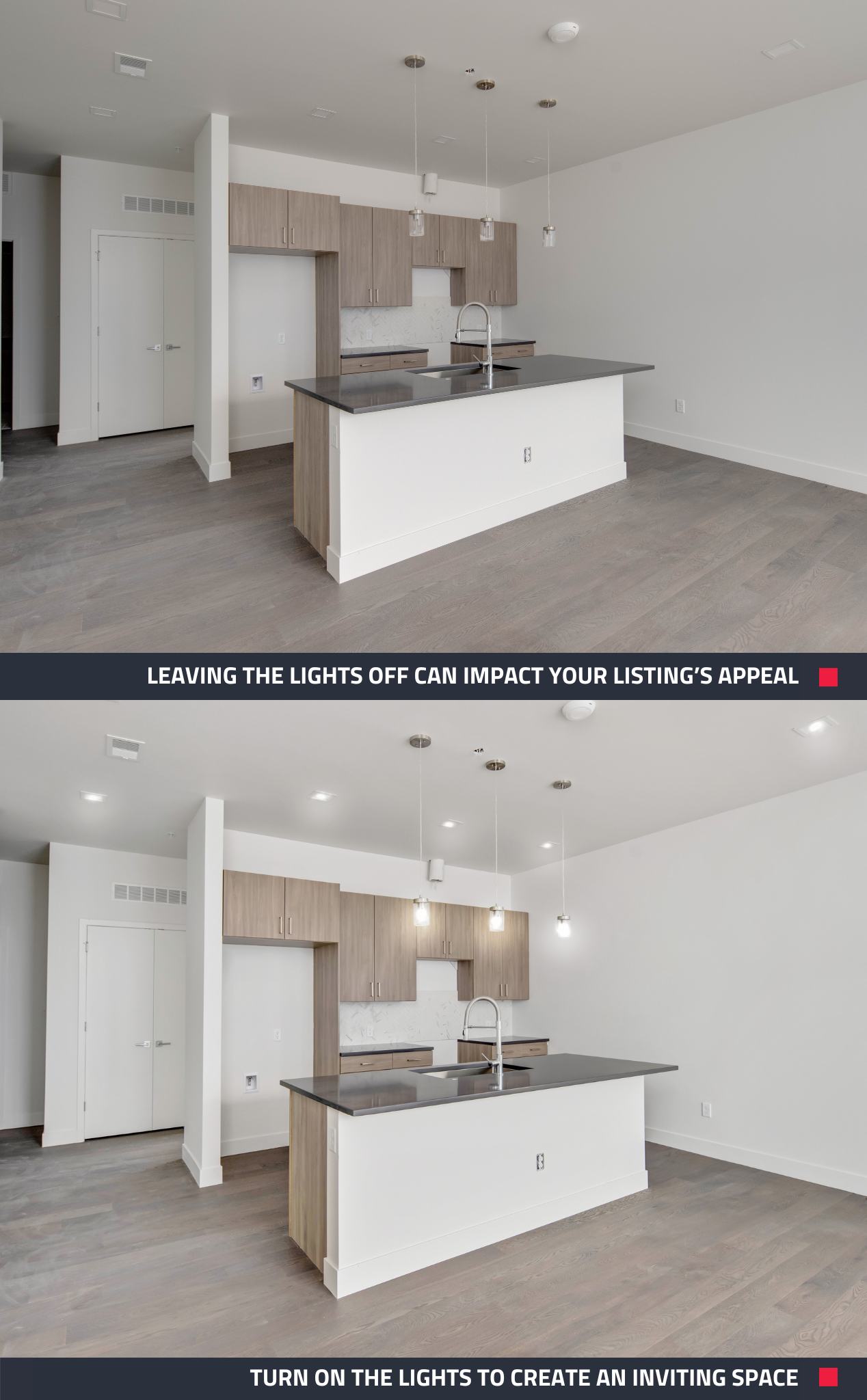
When it comes to real estate photography, there are a lot of things to consider to ensure that the property looks its best. One of the most important things to keep in mind is lighting. In fact, turning on the lights in a property before you shoot can make a big difference in the quality of your photos. Here are 5 reasons why you should turn on the lights at a property before you start your photo shoot.
1. It makes the property look more inviting
Turning on the lights in a property can make it look more inviting and welcoming, which is exactly what you want to convey in your photos. It can also help to highlight the best features of the property and make it look more appealing to potential buyers.
2. It helps to create a warm and cozy atmosphere
A well-lit property can create a warm and cozy atmosphere, which is exactly what buyers are looking for in a home. By turning on the lights, you can create a comfortable and inviting space that buyers will be drawn to.
3. It helps to showcase the property's features
Turning on the lights can help to showcase the property's features, such as unique lighting fixtures or architectural details. It can also help to highlight the layout of the space and make it easier for buyers to envision themselves living there.
4. It can make the property look bigger
Good lighting can make a space look bigger and more open, which is a huge selling point for buyers. By turning on the lights, you can create a spacious and airy feel that will make the property more appealing.
5. It can help to create a consistent look and feel
By turning on all the lights in the property, you can create a consistent look and feel throughout the space. This can help to create a cohesive and polished look in your photos, which will make the property more attractive to potential buyers.
Turning on the lights in a property before you shoot is a simple yet effective way to improve the quality of your real estate photos. So, the next time you're shooting a property, be sure to turn on the lights and see the difference it can make!
Forgot to turn the lights on? No matter! Submit your photos for an Image Enhancement edit, and we can turn them on for you. Just select the Turn on Lights edit under optional extras.
New to BoxBrownie.com? Sign up now and receive 4 edits free. No credit card is needed.
RELATED ARTICLES

Want to take your real estate photos to the next level? These 10 quick tips from Brad Filipponi will help you capture clean, professional images that stand out and sell faster—whether you’re using a phone or DSLR.
READ MORE
Want more Airbnb bookings without breaking the bank? Our latest video reveals how to capture stunning listing photos using just your phone and create professional floor plans. With expert tips from Brad, marketing your Airbnb is now easier than ever.
READ MORE
This blog is for all the real estate pros who like to shoot their own listing photos! Here are 10 easy tips that you need to be doing to take attention-grabbing property photos. Get ready to transform your listings and captivate potential buyers or renters!
READ MORE
Jon Sweeney transformed leasing across a 680-unit portfolio by upgrading listing photos. With sharper images and strategic virtual staging, even hard-to-rent units gained traction—cutting vacancy times and driving faster, more consistent leasing results.
READ MORE
Eager to experiment with 360-degree virtual tours but are nervous about spending too much time and money getting started? In this blog, we put three of the best 360-degree budget cameras to the test to understand if it's possible to produce professional-quality virtual tours for real estate without breaking the bank.
READ MORE
When property listings fail to convert buyers, it is not always price or presentation. It is clarity. Buyers need to instantly understand how the space actually works. Floor plans are key to attracting more qualified buyers and renters. Learn how they make a difference.
READ MORE