SNAPSNAPSNAP: OUR NEW IPHONE APP OFFERS PROFESSIONAL-QUALITY PHOTOS
Achieve Professional-Quality Photos With A Tap Of A Finger
We are thrilled to introduce our brand-new iPhone app, SnapSnapSnap. It's specifically designed for shooting real estate and can drastically increase the quality of the photos taken on an iPhone.
It seems that real estate professionals from across the world, no matter their background, are constantly on the lookout for tools and resources that will make their jobs easier, but not cost a fortune or compromise quality.
With this demand for quality that doesn’t break the bank and smartphone camera capabilities improving with every new model, we saw an opportunity to innovate. We have created a powerful app that captures professional-quality photos so that it is easier than ever for real estate pros who DIY their photography to get stunning images.
SnapSnapSnap is the simplest, fastest, and most cost-effective way to achieve professional-quality photos on your iPhone.
In this video, our co-founder Brad will walk you through how SnapSnapSnap works, what you will need to get started, and how to achieve the best results possible on our app.
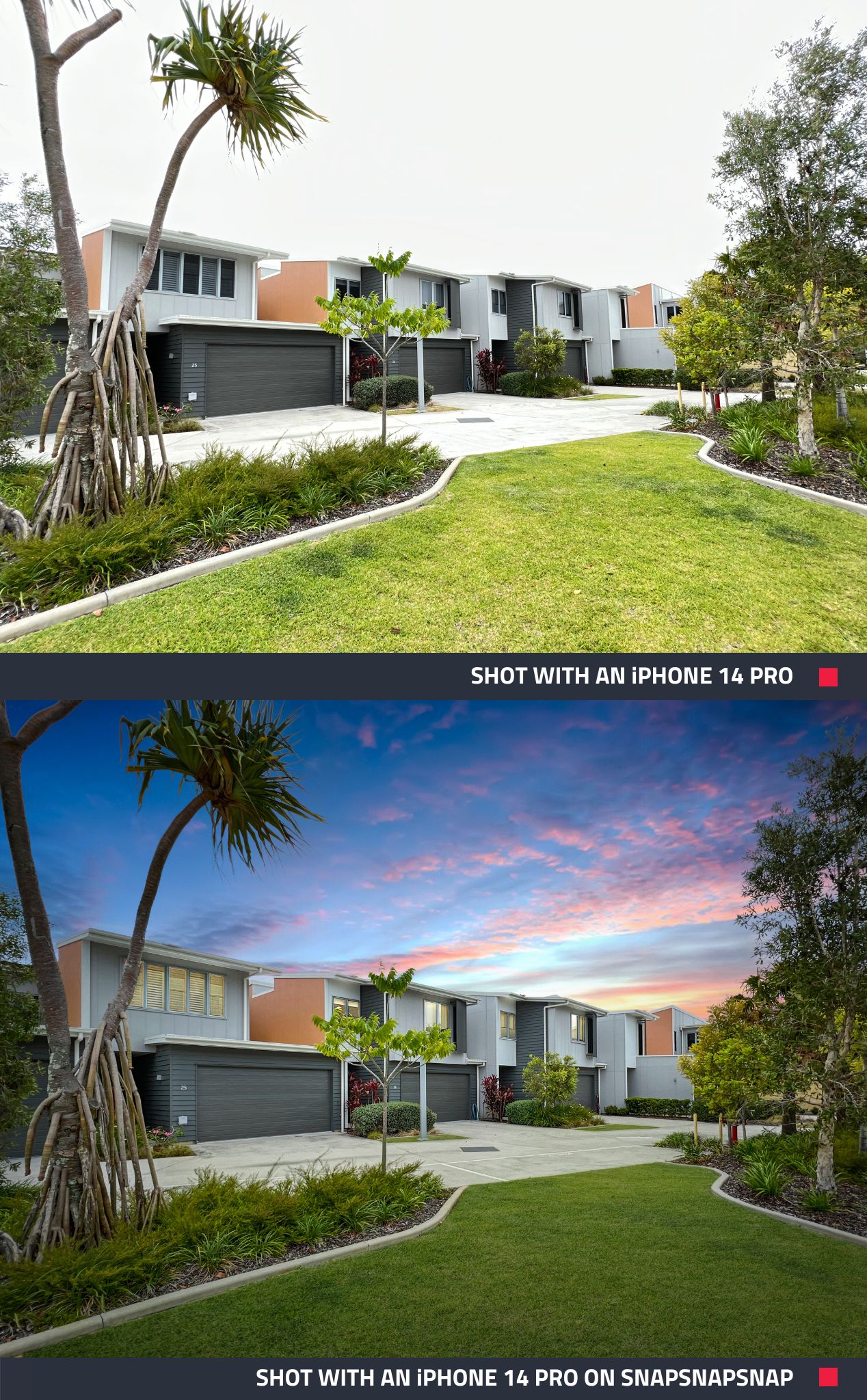 |
| Eye-catching dusk skies made simple with SnapSnapSnap – on the app, it’s easy to submit photos for Image Enhancement and Day to Dusk edit, just like the image above. |
New And Improved Experience With Exceptional Results
With SnapSnapSnap all the complex stuff that will make your photos look amazing is hidden behind the scenes. There’s no toying around with settings like you would with a camera, no special skills or knowledge required and no transferring between files or devices. It’s a true point, shoot and send system.
Designed for real estate professionals and property managers who shoot their own photos on an iPhone, Brad said the app is an easy way to dramatically increase the quality of iPhone photos.
“SnapSnapSnap basically turns your iPhone into a professional camera that is tailored to shoot real estate, this is because every time you take a shot it takes seven brackets of different exposures.
“By shooting this way it provides us with all the information we need to blend the brackets together into a stunning-looking image ready for your marketing,” Brad said.
What will you need:
- A BoxBrownie.com account
- An iPhone 7 or above - Brad recommends using an iPhone 11 or later, thanks to the wide-angle lens
- A tripod to keep your phone nice and steady
- A phone clamp to hold your phone on the tripod
Once you take your photos, you have the choice to apply our Image Enhancement, Item Removal, Virtual Staging or Day to Dusk edit, or even a combination of the edits. Your photos will be sent to our worldwide editing team, so they can work their magic to create images that are set to impress.
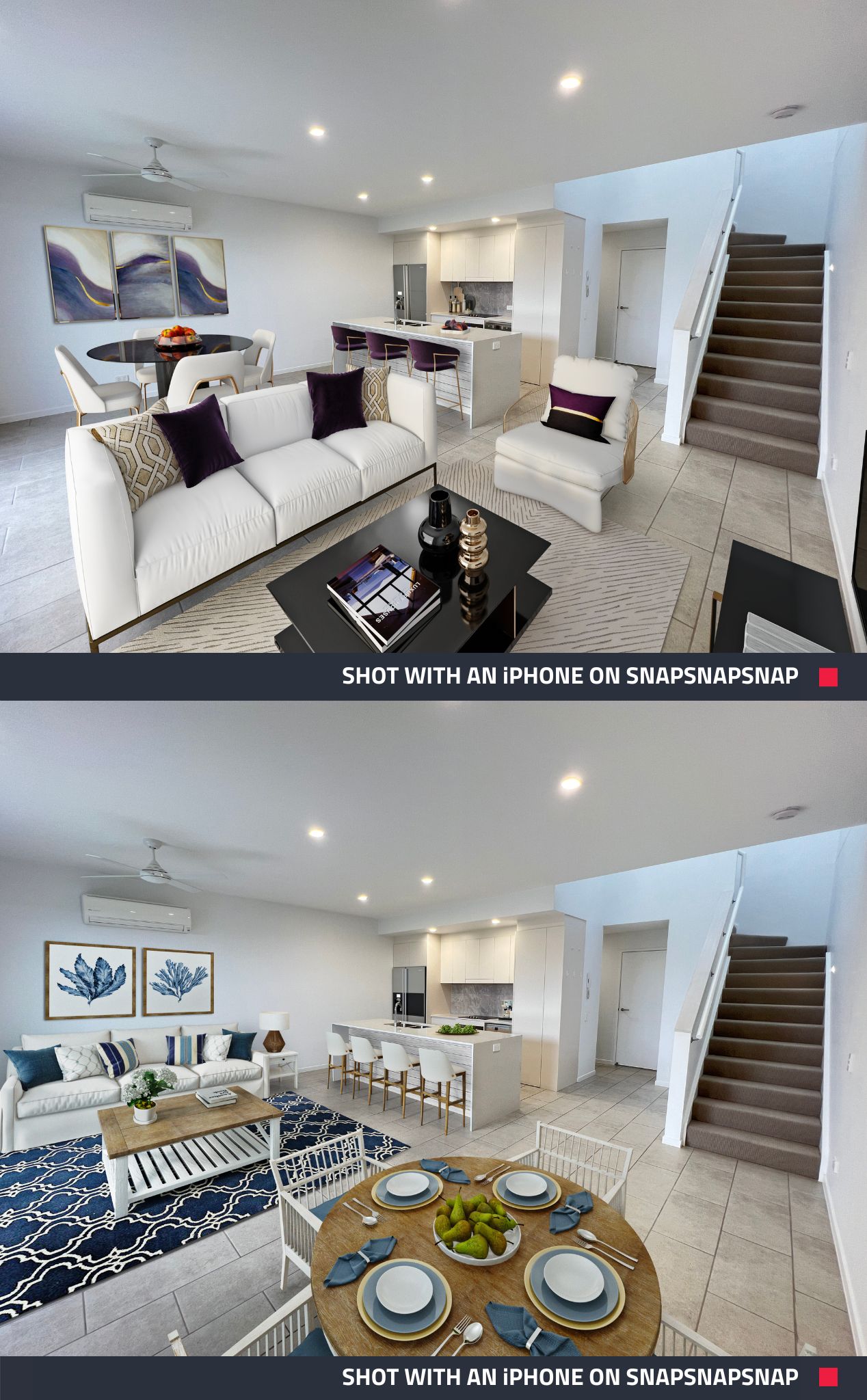 |
| These two photos were taken on SnapSnapSnap and submitted for Image Enhancement and then Virtually Staged in two different styles – Contemporary (top) and Hamptons style (bottom). |
Point, Shoot And Send
Level up your marketing game and try out SnapSnapSnap and see how simple it is. The best thing is, it’s free to download! Click here to download it from the App Store, and you will be well on your way to achieving professional-quality photos, minus the time and expensive equipment.
RELATED ARTICLES

Gotta see it to believe it! Our Virtual Renovation service can transform even an old shed into a stunning Air BnB rental. If you have unused space on your property, this post can show you how to turn that emptiness into income.
READ MORE
Are your property photos attracting buyers or driving them away? Our latest video reveals common mistakes that could be turning buyers off. Discover simple, game-changing fixes to make your listings pop, grab attention, and close deals faster.
READ MORE
Need to get a property listed but your photographer isn’t available? We have the tips on shooting a property with a smartphone when your limited on time.
READ MORE
Want to make any property look bigger and more appealing? Check out this blog for seven super simple photography tips to instantly transform your space. Learn how to capture stunning photos that will attract more buyers or renters!
READ MORE
Ready to stand out and get more leads? Explore five free BoxBrownie.com resources designed to help you capture better photos, streamline your workflow, and create standout listings that drive faster results.
READ MORE
In this blog, we put the two latest market-leading smartphones head-to-head when it comes to real estate photography. Who will come out on top? The Apple iPhone 12 or the Samsung GS20? Check out this blog to see which smartphone we recommend when shooting your latest listing.
READ MORE