SHOOTING REAL ESTATE: IPHONE 13 PRO VS IPHONE 14 PRO
Introduction
Want to know how the iPhone 13 Pro stacks up to the new iPhone 14 Pro when it comes to shooting real estate?
In our latest video, Co-founder Brad Filliponi compares the two models shot for shot and gives you his honest opinion on how they weigh up.
If you’re a real estate professional who shoots their own listing photos, this latest video will show you if the upgrade is worth it for real estate photography.
The cameras in the latest iPhones are awesome - if you’ve been following Brad’s how-to videos then you already know that. He has shared his knowledge and insight on how to use your iPhone to market a property quickly or to virtually stage a listing but when it comes to the two latest iPhone Pro models, is there a difference in photo quality when shooting real estate? In our latest shoot, Brad puts both the iPhone 13 Pro and iPhone 14 Pro to the test.
In This Photo Shoot:
- We take 5 shots of a property, using both the iPhone 13 Pro and iPhone 14 Pro
- All photos are taken using the standard camera app on the iPhone and undergo our Image Enhancement service to ensure they are looking their best.
How Did We Compare?
For an accurate comparison, we replicated each shot with both the iPhone 13 Pro and iPhone 14 Pro. Standing in the exact same position for both shots, Brad sets up the tripod and attaches each device before framing up his shot and snapping a photo.
Want A Sneak Peek?
Get a glimpse of what we found. Do you notice a difference between the two models?
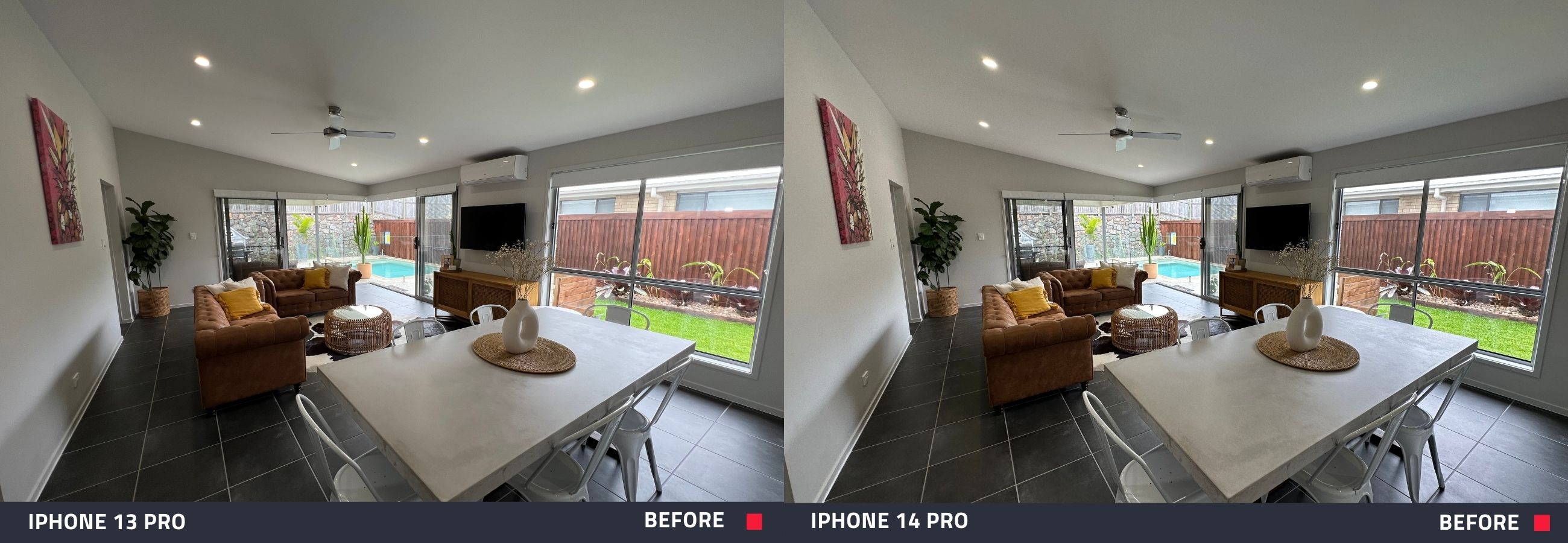 |
| Before our Image Enhancement edit, both photos show a dimly lit space. The images do not accurately reflect the appeal of the home. |
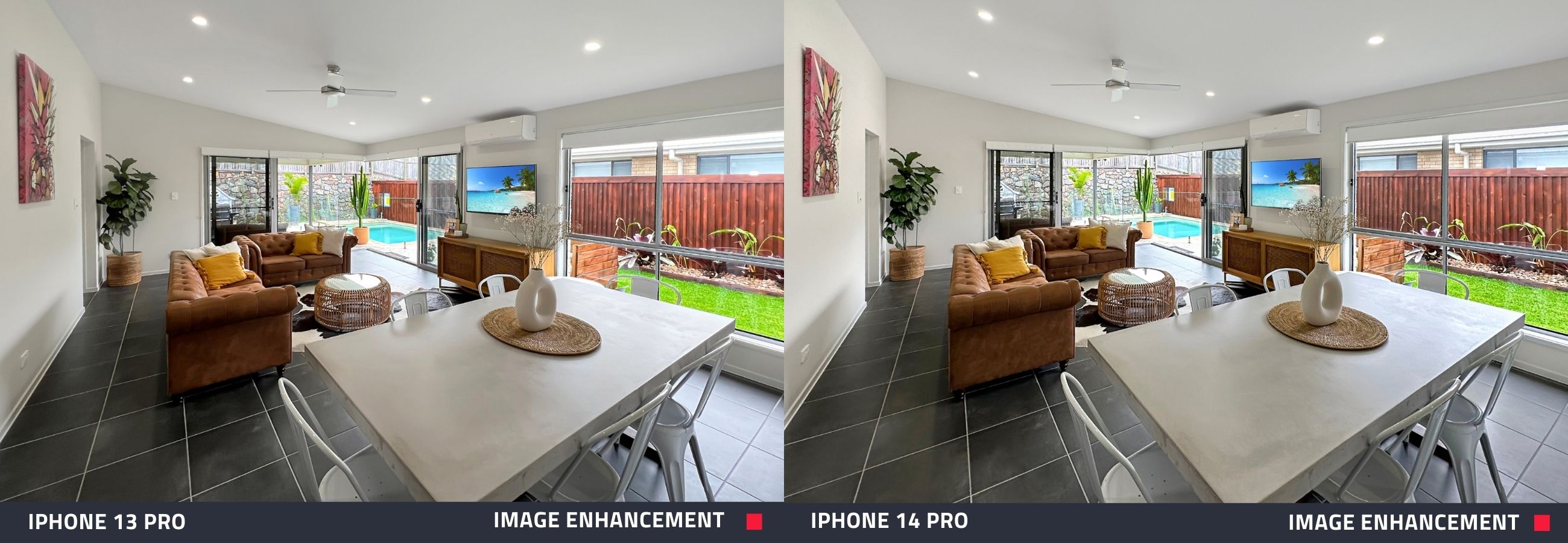 |
| After an Image Enhancement edit, the photos now showcase a space that looks bright, fresh, and appealing. This edit ensures the property is looking its very best. |
Is There A Difference?
At one point during the shoot, Brad recognized a difference between the cameras in each device. It became apparent when he set the iPhone 14 Pro up for a shot.
“Straight away I’m noticing that the lens is a little bit different - it’s actually got more of the shot in,” he said.
What’s The Verdict?
We’re not going to give it away! Watch the video to find out what Brad thinks and see first-hand how the iPhone 13 Pro measures up to the new iPhone 14 Pro when shooting listing photos.
If you want to get an in-depth look at the iPhone 14 Pro, check out our blog on how to shoot real estate with the iPhone 14.
If you’re new to BoxBrownie.com, you can sign up now and receive 4 edits free. No credit card needed.
RELATED ARTICLES
Learn the key tips what to do and what not to do when preparing to market your listing. Adding these secret weapons in could be just the things that makes your listing stand out.
READ MORE
Keep vacation rental photos fresh without a full reshoot. See how StayLuxe Properties uses SnapSnapSnap and BoxBrownie.com to shoot photos and get professional edits whenever the home’s furnishings change.
READ MORE
Explore seven essential tips to capture an impressive real estate hero shot. From perfect timing and lighting to staging and post-editing, implement these strategies to make a lasting impression on house hunters and close more deals.
READ MORE
Selling a home with a breathtaking view but struggling to capture the window detail in your 360 virtual tour? In this tutorial, we will walk you through the shoot process step-by-step and show you just how easy it is to showcase your listing in the best possible light and capture the attention of your potential buyers.
READ MORE
Big news from BoxBrownie.com! We have released a new app, providing real estate professionals with the powerful capability of taking professional-quality real estate photos on an iPhone.
READ MORE
Capturing that perfect drone real estate image might seem like a daunting task, particularly if you’re new to the property photography game, but don’t let that scare you off. In this tutorial, we will walk you through each step of the process from choosing the right drone and taking the perfect shot to having your images professionally edited.
READ MORE